
The Gold tier on Gently Used RVs gets your listing seen by buyers nationwide instead of just within your ZIP code, and it hands you the management tools to convert that attention into offers. If you’re selling in a competitive market, sitting on a strong RV, or running dealer inventory, that combination of nationwide rv listing gold tier benefits is usually where the upgrade pays for itself.
Here’s what you actually get with Gold:
- Nationwide visibility instead of the 20-mile radius your free listing gets, or the statewide reach of Silver
- Expanded photo and video capacity so buyers can see the RV, not just a few blurry snapshots
- A custom analytics dashboard tracking impressions, clicks, saves, and inquiries
- Priority support with a dedicated account manager who can walk you through pricing and listing strategy
- Eligibility for ad placements, live buyer chat, and appointment scheduling
If you’re ready to see what it costs for your situation, the Gold plan details live on the pricing page.
Key Takeaways
The Gold tier works because it combines nationwide search visibility with the analytics, support, and buyer-communication tools sellers need to convert that reach into actual offers.
| Point | Details |
|---|---|
| Visibility jump is the core benefit | Gold moves your listing from local or statewide reach to nationwide search visibility. |
| Analytics dashboard drives decisions | Track impressions, clicks, saves, and inquiries to know when to refresh photos or pricing. |
| Billing is six months, not monthly | Gold costs $199 per six-month term for a single listing, versus monthly Bronze or Silver rates. |
| Measurable lift takes days to weeks | Visual changes appear within hours; click and save improvements typically build over one to two weeks. |
| Gently Used RVs offers Gold with no commissions | The tier includes a dedicated account manager, live buyer chat, and ad-placement eligibility at no added transaction fees. |
Table of Contents
- What’s Included in the Gold Tier Listing
- How Does Gold Compare to Lower Listing Tiers?
- What Results Should You Expect After Upgrading?
- How Much Does Gold Cost, and Are There Discounts?
- How Do You Upgrade to Gold?
- Getting the Most Out of Your Gold Listing
- What Are the Rules and Restrictions for Gold Listings?
- When Is the Gold Tier Actually Worth It?
- Ready to Upgrade Your RV Listing to Gold?
- Sources and Further Reading
- Frequently Asked Questions
What’s Included in the Gold Tier Listing
Gold isn’t one feature. It’s a bundle of seven, and each one solves a different problem sellers run into with free or low-tier listings.
Nationwide visibility and priority placement. Your RV shows up in search results across the country, not just to buyers within driving distance. Because Gently Used RVs geotargets search results by default, a free listing is nearly invisible to someone shopping three states away. Gold removes that ceiling entirely.
Expanded photo and video limits. Bronze caps you at 50 photos; Gold removes that constraint and adds video support. If you’re selling a fifth wheel with a slide-out kitchen and a bunkhouse, you need enough shots to show every angle, and video walkthroughs consistently outperform static photo sets for buyer engagement.
Analytics dashboard. Gold sellers get a dashboard tracking impressions, click-through rate, saves, and buyer inquiries. This is the feature most sellers underuse. A dealer who notices saves climbing but inquiries flat has a pricing problem, not a visibility problem, and the dashboard tells you that in a way a free listing never will.
Dedicated account manager and priority support. Instead of a generic help queue, Gold sellers get a named contact who can flag listing issues, suggest pricing adjustments, or troubleshoot why a listing isn’t gaining traction.
Gold featured card design. Your listing gets a visually distinct card in search results, similar to how third-party RV directories use gold badges or “call now” buttons to draw the eye. Elevated card design is common across the RV listing industry, and it works because buyers scroll fast and gold accents stop the scroll.
Ad placement eligibility. Gold listings can qualify for promoted placements within relevant search results, giving your unit another visibility layer beyond organic geotargeted search.
Live buyer chat and appointment scheduling. Buyers can message you directly and book a viewing without a phone tag marathon.
Pro Tip: Check your analytics dashboard weekly, not daily. Daily numbers bounce around too much to mean anything; weekly trends actually tell you whether a photo swap or price change worked.
Free and Bronze sellers get none of these seven. Silver gets statewide reach but no dashboard, no dedicated manager, and no ad-placement eligibility. Enterprise dealer plans share the dashboard and account manager but add inventory sync across multiple locations.
How Does Gold Compare to Lower Listing Tiers?
The jump from Silver to Gold isn’t incremental. It’s a different category of tool.
Gently Used RVs publishes current pricing for every tier, and that page is the source of truth if numbers shift.
A few things worth noting when reading this table:
- Gold is billed per six months, not monthly like Bronze and Silver, so the effective monthly cost is roughly $33.
- “Per listing” pricing applies to individual sellers; dealers running multiple units should look at per-location enterprise billing instead.
- Priority sort in search results generally favors higher tiers within a given geographic radius, so Gold listings surface above Free and Bronze listings competing for the same buyer.
What Results Should You Expect After Upgrading?
Visual changes like the gold card design and expanded photo gallery typically appear within hours of upgrading. Measurable performance lift, meaning more impressions, clicks, and saves, usually takes days to a couple of weeks to show up clearly in the dashboard.
Track these metrics once Gold is active:
- Impressions — how many buyers see your listing in search results
- Click-through rate — the percentage of viewers who open the full listing
- Saves — buyers bookmarking your RV for later comparison
- Inquiries — direct messages or chat starts
- Booked appointments — the metric that actually predicts a sale
Results vary by listing quality, season, and location. A well-photographed Class A in April will outperform a poorly lit toy hauler listed in January, tier notwithstanding. Nationwide reach expands who can see your listing, but it doesn’t fix a weak headline or a missing price. Learning how location affects RV pricing helps explain some of that seasonal and regional swing.
Pro Tip: Pair the Gold upgrade with a fresh photo set in the same week. Sellers who upgrade and change nothing else see a smaller lift than sellers who upgrade and simultaneously fix their weakest listing element.
How Much Does Gold Cost, and Are There Discounts?
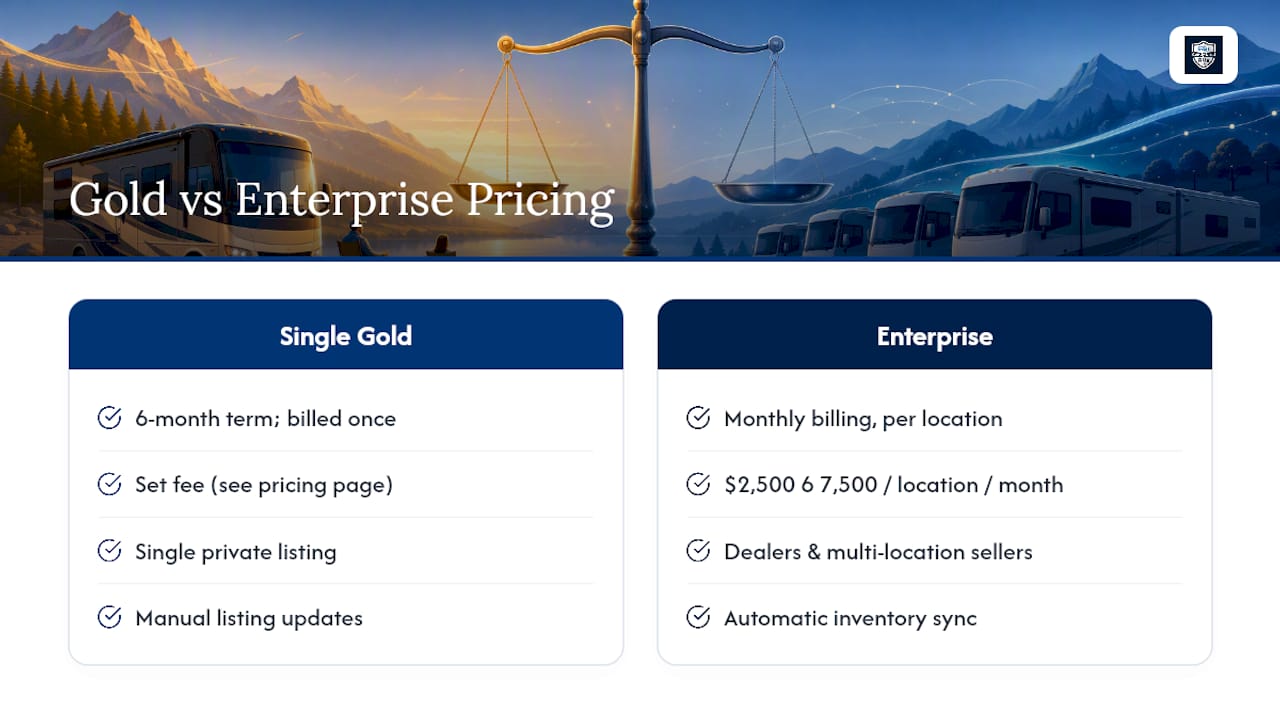
Gold runs a set fee for a six-month term per listing, billed once rather than monthly. That’s the standard consumer rate for a single private-party listing.
Dealers and sellers managing multiple units should look at volume pricing instead of stacking individual Gold subscriptions. Enterprise dealer plans run in the $2,500 to $7,500 per location, per month range, with automatic inventory sync so a dealership doesn’t have to manually update dozens of listings every time a unit sells or a price changes. That range reflects inventory size and the number of locations under one account.
Discounts on volume generally kick in once you’re managing three or more listings or operating across multiple locations, since per-location enterprise pricing is built for that scale rather than a single seller renewing one listing. Because dealer/enterprise plans provide per-location rates and sync tools, the billing calculus changes substantially once you’re past a handful of units.
If you’re evaluating whether Gold or an enterprise plan fits your inventory, contact sales directly. The published pricing page is always the current source of truth, since promotional rates and bundle terms shift periodically.
How Do You Upgrade to Gold?
Upgrading takes a few minutes if your listing information is already accurate.
- Open your existing listing from your seller dashboard, or create a new one using the AI autofill tool if you’re importing details from another site.
- Select the Gold tier from the upgrade menu and confirm the six-month billing term.
- Complete payment and confirm your listing details, including price, location, and specs.
- Verify your contact phone number and email so buyer chat and appointment scheduling route correctly.
- Check that your photo gallery reflects the new unlimited limit and upload additional images or video if you were previously capped.
Before you upgrade, have this ready:
- High-resolution photos, ideally 12 or more, covering interior, exterior, and any slide-outs or unique features
- A verified phone number and email for buyer chat and appointment requests
- Dealer documentation if you’re upgrading a business account rather than a private listing
If the gold card styling or dashboard doesn’t appear within a few hours of payment confirmation, clear your browser cache and reload the listing page first. If it’s still missing, that’s exactly what your dedicated account manager is for.
Getting the Most Out of Your Gold Listing
Nationwide visibility only converts into offers if the listing itself gives buyers a reason to stop scrolling.
Start with your hero image. It should be a clean exterior shot in good light, not an interior close-up. Follow it with at least 12 photos covering every major feature: kitchen, sleeping area, bathroom, storage, hitch or engine compartment, and any upgrades. A short video walkthrough adds real value here, since pairing extra media capacity with a genuine photography investment tends to outperform buying additional ad placements alone.

Write a headline that states year, make, model, and one standout feature, not just “Must Sell.” Fill in every spec field completely; incomplete listings rank lower and get skipped. Price competitively and be transparent about condition, since vague pricing kills trust fast.
Use your analytics dashboard to run small experiments. Swap your primary photo for a week and compare click-through rate before and after. Adjust your asking price slightly if saves are high but inquiries are low. These read-and-react cycles are what separates a Gold listing that sells in three weeks from one that sits for three months.
- Pro Tip: Respond to buyer chat messages within an hour when possible. Response time is one of the strongest predictors of whether an inquiry turns into a booked appointment.
- Pro Tip: If your dashboard shows impressions climbing but clicks flattening, refresh your photos before touching your price. A tired photo set often looks like a pricing problem when it isn’t one.
If your RV needs a little work before it photographs well, a detailing pass before you list makes a measurable difference in how the same unit performs in search.
What Are the Rules and Restrictions for Gold Listings?
Gold covers one RV or one park model per listing. If you’re selling multiple units, each one needs its own listing rather than being bundled under a single Gold subscription. This applies across every category Gently Used RVs supports, from Class A motorhomes down to teardrop trailers.
A few restrictions to know before you upgrade:
- You can’t substitute a different RV into an existing listing once it’s live; selling your unit and buying a new one requires a new listing.
- Reviews and listing history don’t transfer between listings, even for the same seller account.
- Prohibited content rules still apply at Gold tier, including no misleading pricing and no listing units you don’t have the legal right to sell.
- Dealer or enterprise exceptions, like bulk transfers or account restructuring, go through your account manager rather than standard support.
If your situation doesn’t fit neatly into these rules, contact support or your dedicated account manager directly. Policy exceptions for dealers and high-volume sellers are handled case by case.
When Is the Gold Tier Actually Worth It?
Gold earns its price back fastest in high-competition markets, where a dozen similar units are fighting for the same buyer pool within driving distance. It also pays off for dealer inventory that already turns over reliably, and for any unit where the photos and specs are strong enough that the only real bottleneck is visibility.
Where Gold underperforms is on listings that haven’t been fixed up first. Nationwide reach on a listing with three dark photos and no price just means more people scroll past a weak listing faster. Fix the fundamentals, then buy the reach.
Ask yourself these four questions before upgrading:
- Is your local market saturated with similar units competing for the same buyers?
- Do you already have 12 or more solid photos, or are you willing to shoot them before upgrading?
- Are you selling a higher-value unit where a faster sale meaningfully offsets the $199 cost?
- Do you have the bandwidth to respond quickly to buyer chat and inquiries once traffic increases?
If you answered yes to two or more, Gold is probably the right move. If you answered mostly no, Silver or a Bump to Top on your free listing might be the smarter starting point.
Ready to Upgrade Your RV Listing to Gold?
If you’ve read this far, you already know Gold isn’t a gimmick tier. It’s the version of your listing that behaves like a professional sales tool instead of a digital flyer. Gently Used RVs built Gold specifically for sellers who need nationwide eyes on their RV and the dashboard, dedicated support, and buyer chat to turn that attention into a closed deal, without paying commissions or hidden fees along the way.
Whether you’re a private seller with one strong unit or a dealership managing dozens of listings across multiple lots, there’s a plan sized for you. Private sellers can compare every tier on the Gold, Silver, Bronze, and Free pricing page, while dealerships running higher volume should look at enterprise inventory plans with per-location sync and volume discounts. Not sure which fits your inventory? Contact sales for an enterprise quote, or upgrade your existing listing to Gold directly from your seller dashboard today.
Sources and Further Reading
For sellers who want to verify pricing, features, or eligibility before upgrading, these pages cover the details directly:
- How It Works explains the free listing model, the AI autofill tool, and how geotargeted search ranks listings by tier.
- RV Types Guide confirms which RV categories, from Class A motorhomes to teardrop trailers, are eligible for listing upgrades.
For broader context on listing presentation, RVshare’s owner toolkit offers general best-practice guidance on photos and descriptions that applies across marketplaces. If you’re investing in gear to improve how your RV shows on camera, the 15ft Levitator is a practical staging tool worth considering before your next photo shoot.
Frequently Asked Questions
Does Gold guarantee my RV will sell faster? No upgrade guarantees a sale. Gold expands who sees your listing and gives you tools to improve it, but final results depend on price, condition, photos, and market demand.
Can I downgrade from Gold before the six months ends? Gold is billed as a six-month term rather than a recurring monthly charge, so check the current terms on the pricing page for any mid-term change policies.
Do dealers need Gold, or should they go straight to enterprise? Dealers with more than a couple of units typically save money and time with an enterprise plan, since it includes inventory sync and per-location billing instead of managing separate Gold subscriptions per unit.
Will my listing keep its reviews if I upgrade to Gold? Reviews don’t transfer between separate listings. If you’re upgrading an existing live listing rather than creating a new one, your existing history stays intact.
What happens if the analytics dashboard doesn’t show data right after upgrading? Give it a few hours to populate, since it needs fresh traffic to generate metrics. If it’s still empty after a day, contact your dedicated account manager.